An AI software factory for any project
Buildline installs a spec-driven pipeline that coding agents follow from idea to merged PR, with real quality gates, independent verification, and a clear place for developers, designers and product managers.
Works with Claude Code · Codex · Cursor · Gemini CLI · GitHub Copilot and anything that reads AGENTS.md

Agents can build the feature. They need a factory around them.
Most repos give coding agents a prompt and hope. Buildline gives them the three things that turn a good demo into work you can merge.
A definition of done
Requirements and Given/When/Then scenarios that a human owns, locked while the agent builds so the goalposts can't move.
A way to check the work
Your own lint, types, tests and build as gates, plus a verifier agent that never saw the code being written.
Memory between sessions
Specs, task lists with passes flags and progress logs on disk, so any session picks up exactly where the last one stopped.
One line, sized to the change
Every change moves through the same stations, each with a plain markdown playbook. Small fixes skip the ceremony; epics get split before anyone writes code.
fix intake → build → verify → ship
feature every station
epic spec, then split into features
Everyone gets a station, not just developers
Product managers and designers work in a local dashboard or plain markdown. Developers stay in their terminal and editor.
Product managers
Write the brief, own requirements and acceptance scenarios, and approve specs from the dashboard with npx buildline ui.
Designers
Bring a Figma link or screenshots to /buildline-design. Flows, states, components and copy become part of the spec the agent builds against.
Developers
Own the technical design, the plan and the merge. Run stations in Claude Code, or let buildline run take a feature to a ready PR.
Your models, for each job
Fable to plan, Opus to build, Codex to review, or anything else your tools support. Buildline reads what's available from Claude Code and the Anthropic API, so tomorrow's models show up without an update.
- Pick by phase or per station, or type any model name or id.
- Aliases keep up:
fablealways means the newest Fable. Full ids pin a model. - Codex and Gemini stations are handed off automatically.
$ npx buildline models set planning fable
$ npx buildline models set building claude-opus-5-5
$ npx buildline models set review codex

$ npx buildline models check
  ✔ fable            → claude-fable-5-1
  ✔ claude-opus-5-5  → claude-opus-5-5
  ✔ codex            → installed
Watch the line move
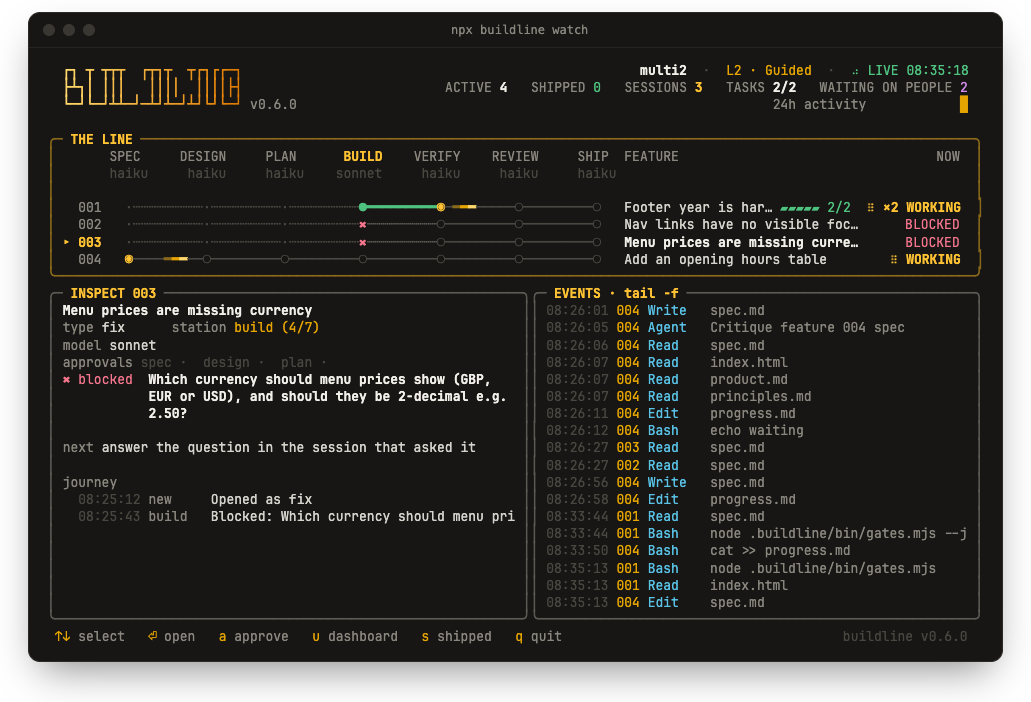
npx buildline watch draws every feature on its own track through the stations and updates live. Run several Claude Code sessions at once: a comet means a session is working on that feature right now, and a blocked feature shows the question it's waiting on.
Rules that hold, not rules that hope
Instructions in prose are advice. These are enforced by hooks, separate contexts and files on disk.
- Acceptance lock. A hook blocks edits to a spec's acceptance scenarios while the feature is being built, verified or reviewed.
- Independent verification. The verifier starts in a clean context with only the spec, so the builder never grades its own work.
- Evidence before done. A task flips to
"passes": trueonly after its check and the gates have been run and observed. - Humans merge. Always, at every autonomy level.
- Your files stay yours. Marked blocks, hash-tracked files, edits kept on update, and a clean
remove.
Dial it up as trust is earned
Start guided. Raise the level when your gates and acceptance scenarios have proven themselves. At level 3, buildline run drives Claude Code's /goal until the feature is ready.
Assist
A human approves every station. The agent never moves on alone.
Guided
Humans approve spec and plan. Agents build, verify and review.
Autopilot
Humans approve the spec. Plan through review runs unattended.
Dark factory
Spec to ready PR with no checkpoints. A human still merges.
Two minutes to your first feature
Works on an empty folder and on a ten-year-old monorepo, in any language or framework. Buildline shows every file before it writes anything.
npx buildline
Detects your stack and test, lint and build commands, then asks five quick questions.
/buildline-onboard
Interviews you and scaffolds a new project, or maps an existing codebase into context.
/buildline-new
Describe the idea. Buildline sizes it, opens a spec and tells you the next step.